
A Ticketing System for WhatsApp Business Messages
Turn WhatsApp Business messages into support tickets. Chronodesk integrates with WhatsApp Business, so every message, voice note and image becomes a trackable ticket with an owner, a status and an SLA.
Chronodesk converts incoming messages on your own WhatsApp Business number into structured support tickets that can be assigned, prioritised and tracked against an SLA, instead of leaving them in a shared phone or group chat.
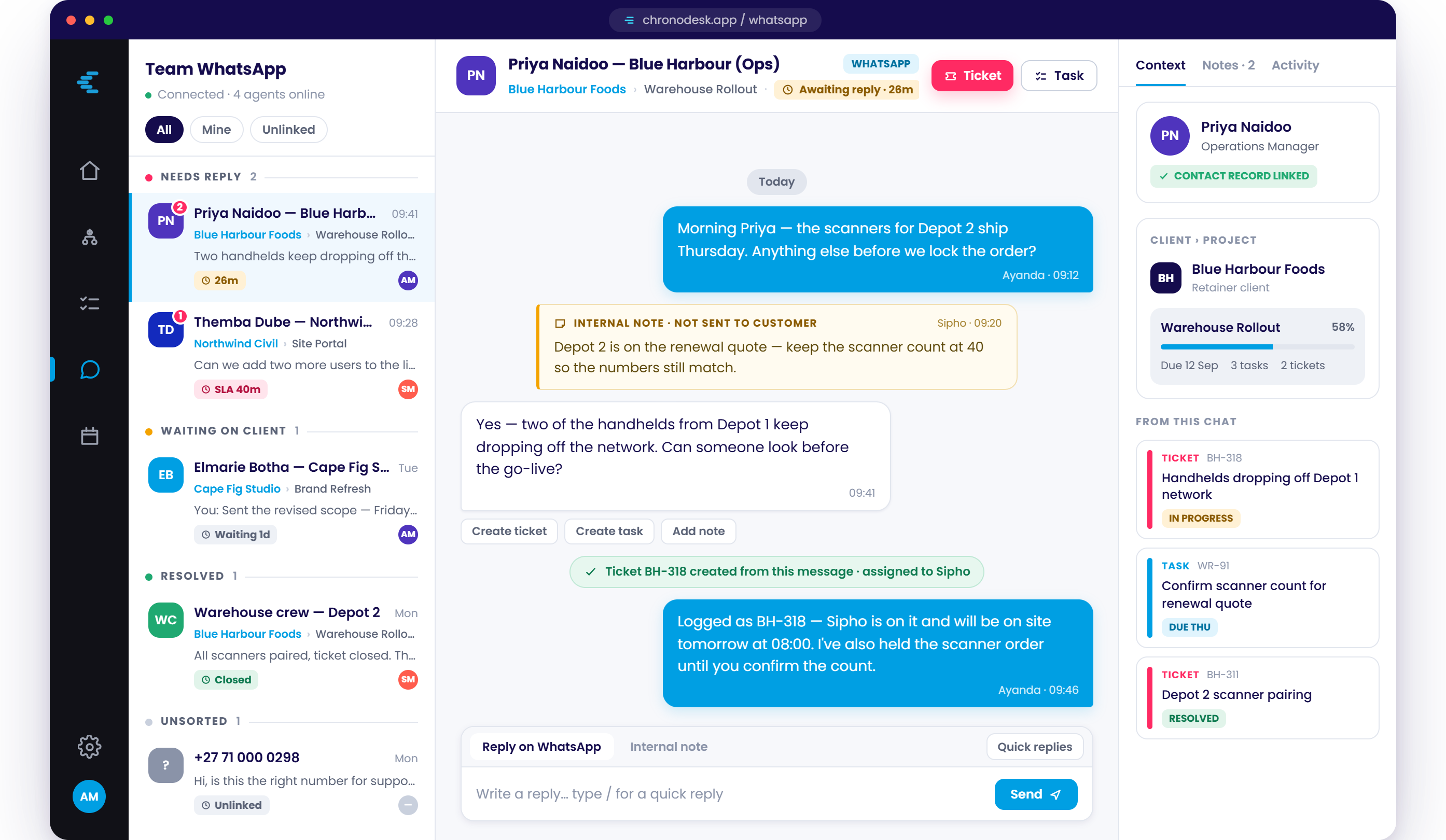
How a ticketing system for WhatsApp Business works
A customer messages your WhatsApp Business number. Chronodesk receives the message, creates a ticket, and attaches the full conversation — text, images, documents, voice notes and shared locations — to it. From that point the request behaves like any other service desk ticket: it has a reference number, an owner, a priority and a response and resolution clock.
Message arrives
Incoming messages on your connected WhatsApp Business number are captured with the sender's number and the full message body, including attachments and voice notes.
Ticket is created
The message becomes a ticket with a reference, a customer record, a priority and a queue. Replies from the agent go back out over the same channel and stay on the ticket timeline.
Work is tracked
Response and resolution targets run against the ticket, time is logged against it, and it closes with a full history — the same reporting you get on email and portal tickets.
This page covers the WhatsApp Business channel itself. If you want AI to draft and resolve those conversations automatically, see the AI service desk. If you are choosing a platform for every channel rather than this one alone, start with service desk software.
A connected helpdesk vs a shared WhatsApp Business number
A shared WhatsApp Business number or a support group chat has no queue, no owner and no history you can report on — and it usually gets bolted to the service desk with plugins, automation tools and manual copy-paste. Helpdesk software that integrates with WhatsApp Business brings those requests into the service desk directly instead.
Listen directly in the ticket.
Technicians on site? Clients in a rush? Receive voice notes directly into the ticket timeline. Your team can play them back without leaving the desk, keeping important context attached to the customer request.
- No file downloads required
- Native audio player
- Stored securely in ticket history
What is a WhatsApp ticket?
A WhatsApp ticket is a support ticket created automatically from a message sent to a company's WhatsApp Business number. Instead of the request staying in a chat thread, it becomes a numbered record with an owner, a status, a priority and a response deadline — so it can be assigned, tracked, escalated and reported on like any other support request.
The term describes the outcome, not a separate product. In Chronodesk the ticket is an ordinary service desk ticket that happens to have arrived over WhatsApp Business rather than over email or a web form, and it sits in the same queue, under the same SLAs, as everything else your team works on.
How a message becomes a ticket
-
A customer messages your number. Text, voice notes, photos and documents all arrive on the WhatsApp Business number you already own and publish.
-
Chronodesk opens a ticket. The message, the sender and every attachment are captured together, so the ticket carries its own context instead of pointing at a chat someone has to go and read.
-
Routing and the SLA clock start. The ticket lands in the queue you chose, gets an owner and a priority, and its response and resolution targets begin counting — the part a shared phone cannot do.
-
Your team replies in the same thread. The customer carries on in WhatsApp as normal. Internally the exchange is a tracked ticket that can be escalated, reported on, and billed against time — see SLA management for how the targets are set.
Built for Real-World Support Teams
Chronodesk is useful for teams that already receive customer or internal requests through WhatsApp Business and need a more structured way to manage the work, from IT support teams using PSA software for MSPs to brokerages using insurance broker software for policy and claims queries.
Ticket routing and SLAs for requests sent over WhatsApp Business
Tickets from WhatsApp Business route into the same queues, teams and priorities as everything else, and run against the same response and resolution targets. Track ownership, status, response times and resolution progress from one place — see SLA management software for how the targets and escalations are configured.
Request a Demo
Share your details and our team will contact you to show how Chronodesk can turn WhatsApp Business messages into trackable support tickets.
Integration with WhatsApp Business FAQ
How do WhatsApp Business messages become support tickets?
Chronodesk captures incoming messages on your own WhatsApp Business number and converts them into structured support tickets that can be assigned, prioritised and tracked. Every message, voice note and image becomes a trackable ticket with an owner, a status and an SLA, instead of sitting in a shared phone or group chat.
Does Chronodesk need plugins to connect to WhatsApp Business?
No. The integration is built into Chronodesk, so there are no third-party plugins or automation add-ons to maintain. Each conversation becomes a ticket complete with the original message, attachments and voice notes, so your team can respond, track response times and resolve requests from one place.
Do I need the WhatsApp Business API?
Chronodesk connects to a verified WhatsApp Business Account that you own. The WhatsApp Business API is provided by Meta Platforms, Inc. and is subject to their terms and charges. Book a demo and our team will walk you through what is required to get your workflow live.
What does WhatsApp ticketing mean?
WhatsApp ticketing means running customer requests that arrive over WhatsApp Business through the same ticketing process as email or web-form requests: each message opens a ticket with an owner, a status, a priority and a response deadline. It is a way of working rather than a separate product — the point is that a request sent by message stops being invisible to your reporting and starts being tracked, escalated and measured like every other support request.
Can a service desk run on WhatsApp Business?
Yes, provided the channel feeds a real service desk rather than replacing it. A WhatsApp Business number on its own has no queue, no ownership, no priority and no SLA clock, so requests are only as reliable as whoever happens to be holding the phone. Chronodesk connects the number to a service desk that supplies all four, while your customers carry on using WhatsApp exactly as they already do.
How do I connect WhatsApp Business to a helpdesk?
Connect your WhatsApp Business number to the helpdesk so incoming messages create tickets and agent replies are sent back over the same channel. In Chronodesk this is built in rather than a plugin: you connect the number, choose which queue new tickets land in, and set the response and resolution targets that apply to them. Each connected number is billed as one additional Chronodesk licence at your plan rate — R450 ($30) on Professional, R600 ($40) on Advanced. That covers the Chronodesk connector only; WhatsApp Business messaging charges are billed to you directly by Meta. See Chronodesk pricing for the full plan breakdown.
Chronodesk is an independent business software platform and is not affiliated with, endorsed by, or sponsored by WhatsApp LLC or Meta Platforms, Inc. WhatsApp is a trademark of WhatsApp LLC. Chronodesk connects to a WhatsApp Business account that you own and operate.