
Professional Services Automation (PSA) Software Run your services business on one platform — not five.
Connect project delivery, resource capacity, billable timesheets, service desk retainers, and automated invoicing. Replace tool sprawl with real-time margin visibility.
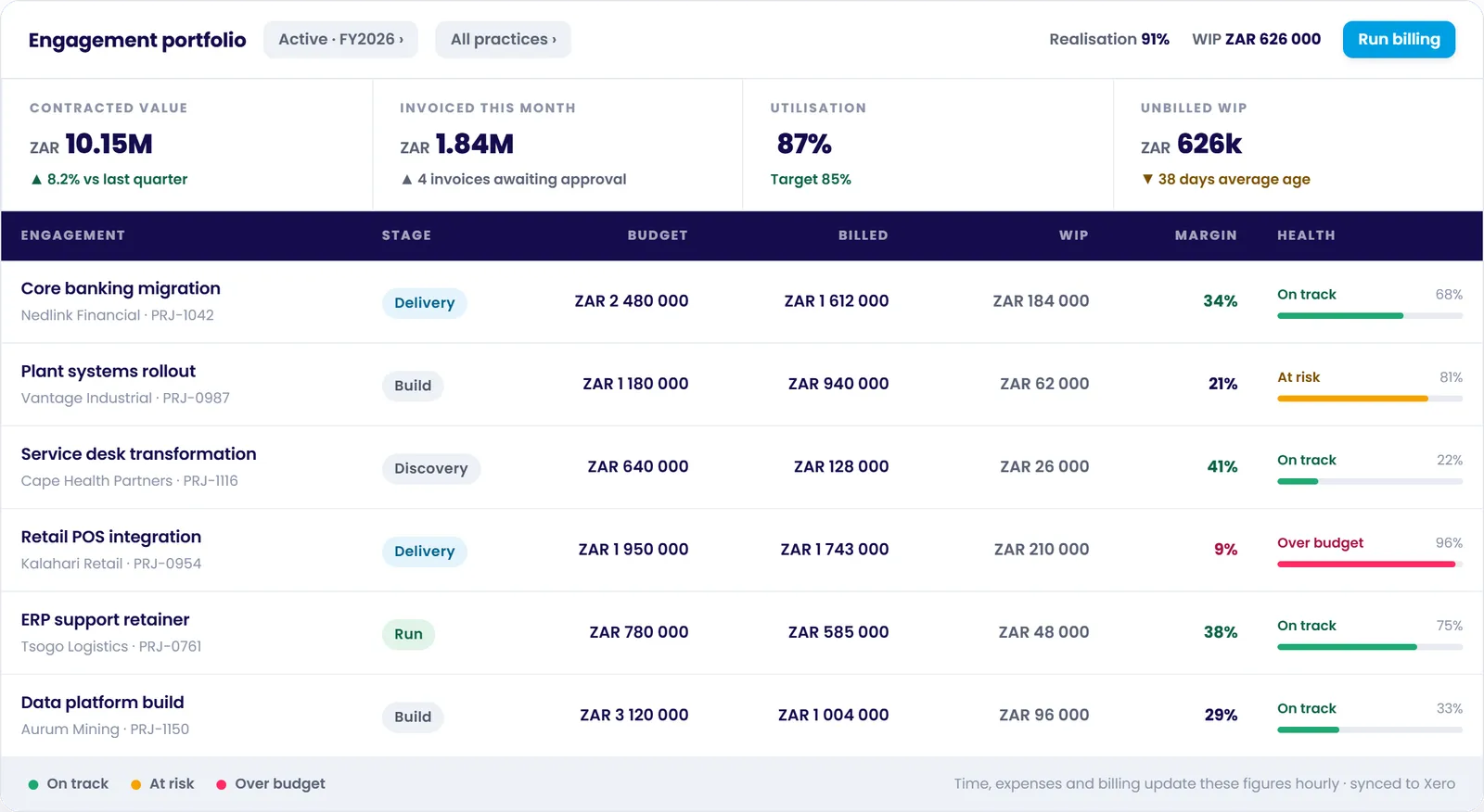
87% Billable Utilisation
Across full active consultant roster
Automated Xero Invoicing
Zero manual spreadsheet calculations
What is Professional Services Automation (PSA) Software?
Professional Services Automation (PSA) software is a comprehensive operational platform designed specifically for project-based services organisations. It integrates project delivery, resource management, time & expense tracking, client billing, service desk ticketing, and engagement accounting into a single unified data architecture.
The professional services automation category emerged because services businesses operate on fundamentally different economics than product or retail companies. In a services firm, your product is human expertise, and your primary cost is payroll. Your profitability hinges directly on the margin between what an hour of delivery costs to produce and what it is billed at.
When delivery records (Jira, Asana, Monday), time logs (Harvest, Toggl), support tickets (Zendesk, Freshdesk), and invoicing (QuickBooks, spreadsheets) sit in isolated software silos, commercial visibility breaks down. Leadership cannot see project margin erosion until weeks after work is delivered. PSA eliminates this fragmentation by turning time and rate cards into the connective tissue of your business.
Built for the Way Modern Services Firms Actually Operate
Explore how Chronodesk orchestrates the entire client lifecycle from sales pipeline to delivery, support, and financial realization.
Frictionless Timesheets That Eliminate Billable Leakage
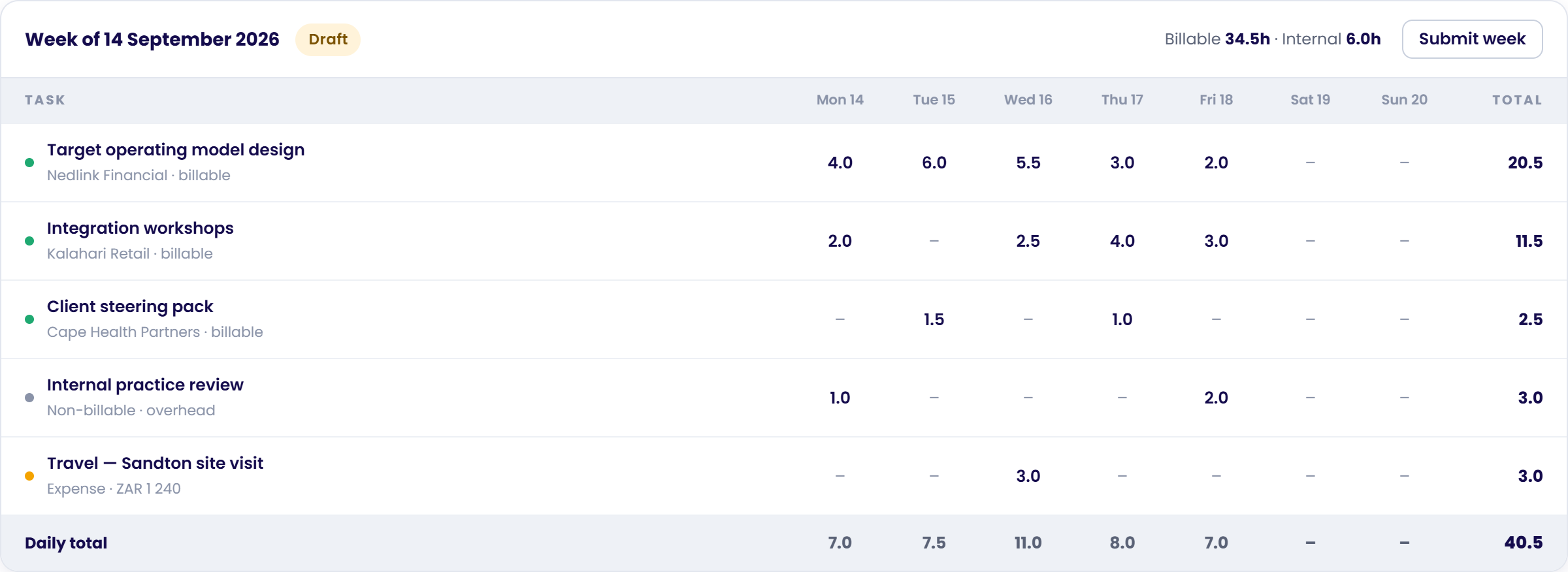
Every timesheet entry in Chronodesk carries a linked project, task, rate card, and billable flag right at capture. Consultants log their week in under two minutes, while managers get instant visibility into billable vs internal overhead hours.
- ✓ Pre-populated task lists: Consultants only see work they are actively allocated to.
- ✓ Expense rebilling: Log travel and direct costs linked to client engagements for automatic markup.
- ✓ One-click approvals: Practice leads approve time with full context before invoicing.
Turn Delivery Hours & Milestones into Invoices in Seconds
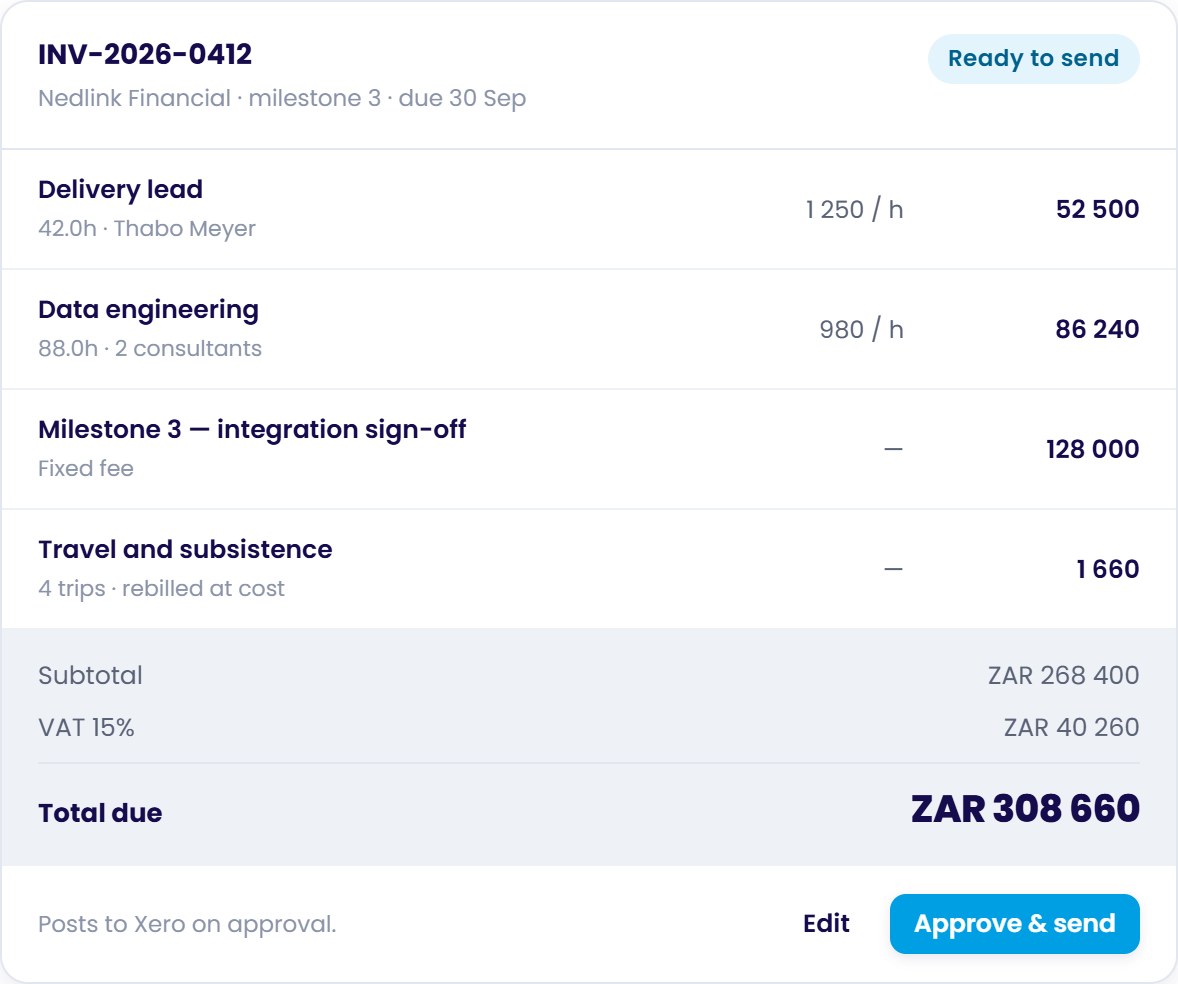
Stop spending the first week of every month reconciling spreadsheets. Chronodesk generates invoices directly from approved timesheets, fixed-price milestone sign-offs, and retainer commitments with rate card accuracy.
- ✓ Multi-model billing: Mix Time & Materials, fixed fee, and retainers on the same client.
- ✓ Multi-currency: Invoice each client in its own currency with multi-currency billing and exchange rates applied automatically.
- ✓ Live Xero integration: Approved invoices post directly into your accounting ledger.
- ✓ WIP tracking: Monitor unbilled Work in Progress so cash flow never lags delivery.
Live Margin Visibility, Realisation Rates & Effective Hourly Yield
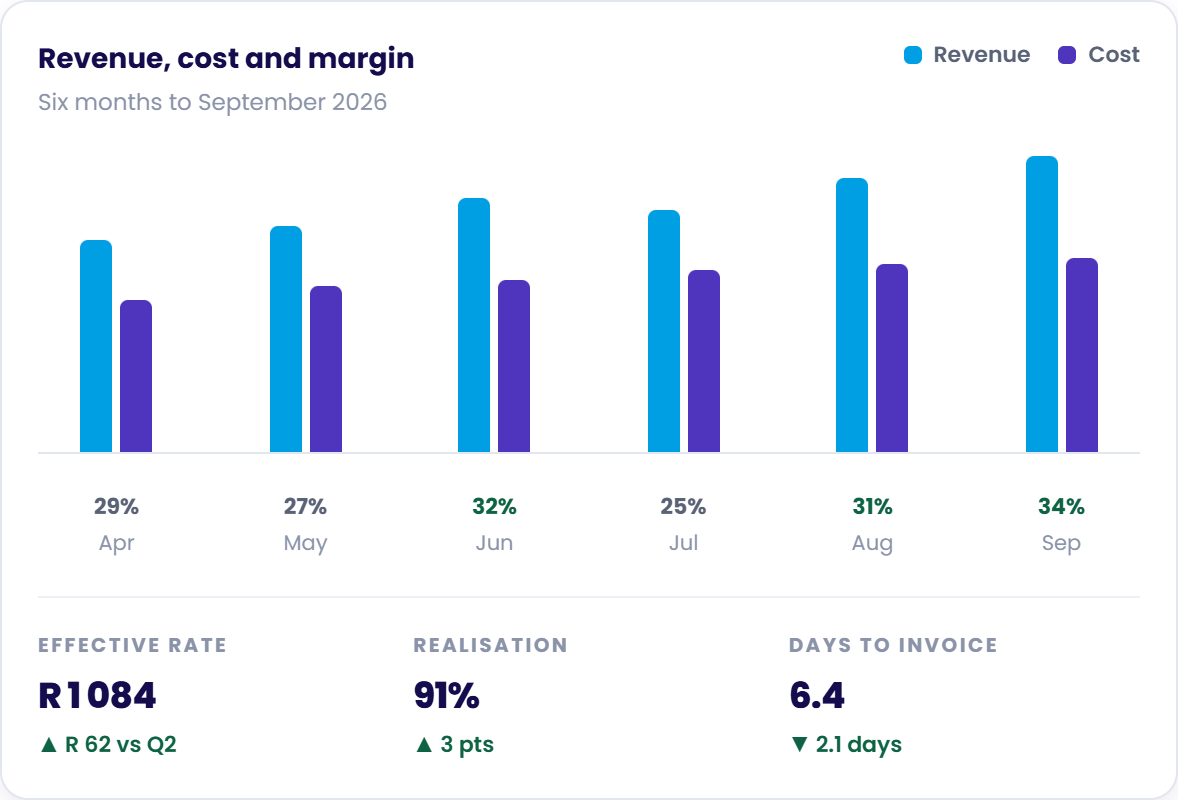
Traditional accounting only tells you if the company made money overall. Chronodesk PSA breaks down profit and loss per engagement, per practice, and per consultant so you know which clients generate real returns.
- ✓ Realisation tracking: Measure billed revenue vs standard list price yield.
- ✓ Effective hourly rate: See the true blended yield per delivery hour across fixed-fee projects.
- ✓ Days to invoice: Shorten the billing cycle from weeks to hours to accelerate cash collections.
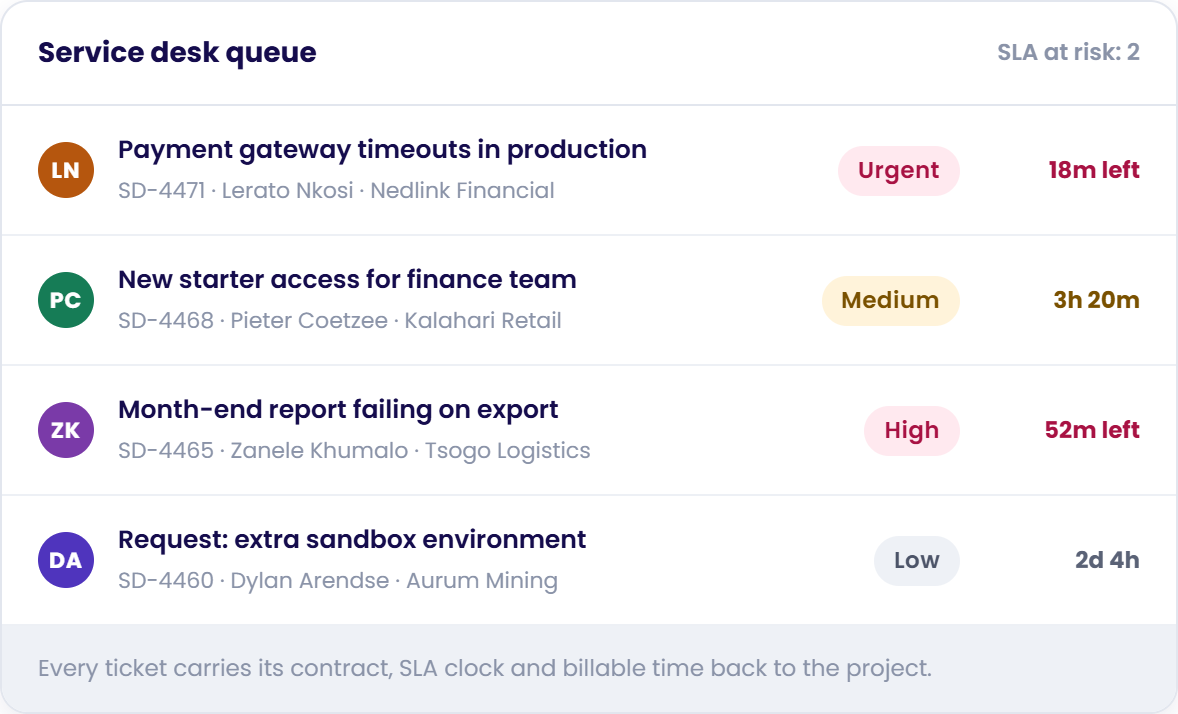
Connect Ongoing Support Directly to Project Contracts & Retainers
Most PSA tools ignore service management, forcing teams to buy separate ticketing software where support hours get lost in overhead. Chronodesk integrates your service desk so ticket hours automatically draw down against retainers.
- ✓ Multi-tier SLA governance: Automated countdown timers and pre-breach alerts.
- ✓ Omnichannel intake: Tickets created automatically from email, web forms, or WhatsApp.
- ✓ Retainer burn tracking: Real-time visibility into committed vs consumed support hours.
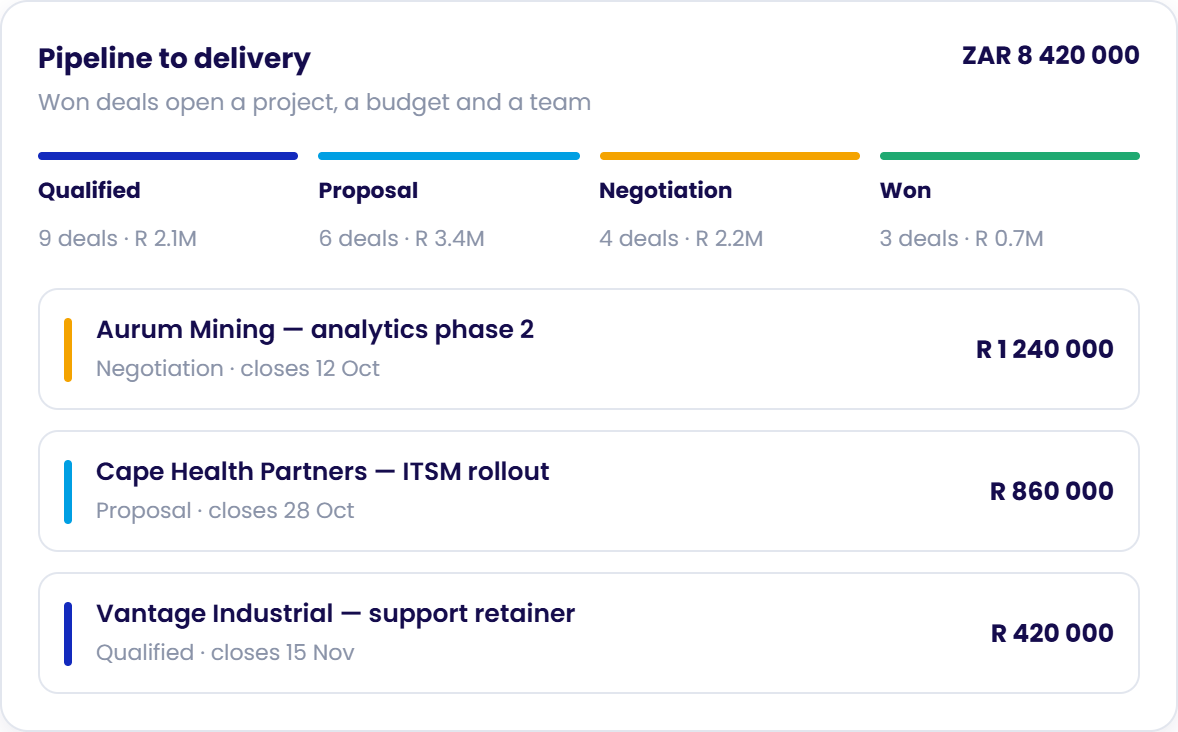
Turn Won CRM Deals into Staffed Projects in One Click
When sales closes an opportunity, Chronodesk automatically spins up the project workspace, assigns the rate card, reserves team capacity, and links client intake forms — ensuring zero delivery momentum is lost.
- ✓ Pipeline capacity forecasting: Anticipate hiring needs before deals close.
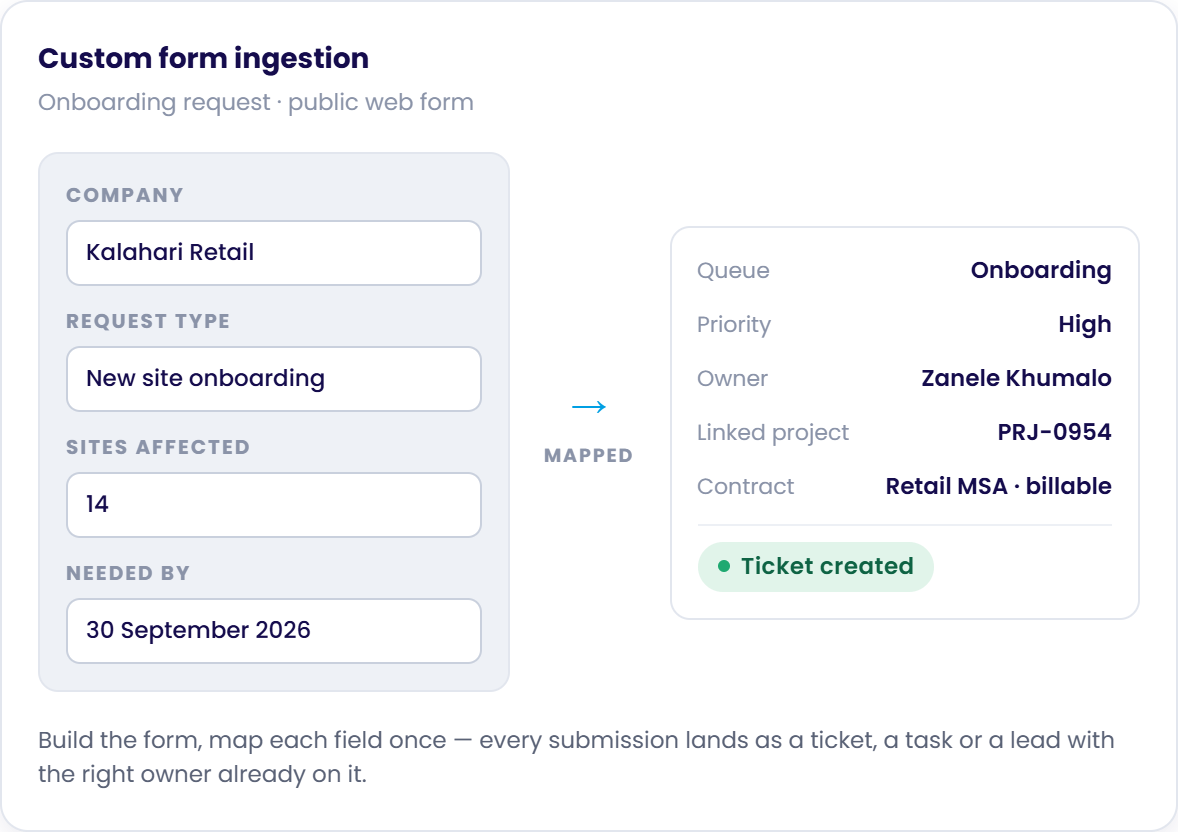
- ✓ Custom intake forms: Public web forms map directly into scoped tasks and tickets.
- ✓ Role authorization profiles: Fine-grained control over who views margins, approves time, or edits rate cards.
PSA Software vs Project Management Tools vs ERP
Choosing the wrong software category is expensive. Here is how Professional Services Automation differs from standalone task management and heavy enterprise ERPs:
| Dimension | Chronodesk PSA Recommended | Generic PM Software | Enterprise ERP |
|---|---|---|---|
| Primary Question It Answers | ✓ Is this engagement profitable, and do we have the qualified capacity to deliver it? | Is this task on schedule and who is assigned? | Is the entire legal entity financially sound across general ledger and supply chain? |
| Core Operating Unit | ✓ The billable client engagement — project, milestone, retainer or support ticket | The individual task and its sequential dependencies | The financial general-ledger transaction and cost centre |
| Time & Expense Tracking | ✓ Native and central. Every logged hour carries a project, rate card, billable flag and cost basis | Optional or progress-only; disconnected from invoicing and rate cards | Payroll-oriented, periodic and rarely mapped to granular delivery milestones |
| Resource Management | ✓ Live capacity planning, skill matching and billable utilisation across the entire active portfolio | Task allocation within a single project silo; no cross-portfolio capacity view | High-level headcount and department budget allocations |
| Billing & Invoicing | ✓ Built-in: automated Time & Materials, fixed-fee milestones, retainers, and expense rebilling to Xero | None. Requires manual exports, CSV gymnastics or third-party plugins | Comprehensive general ledger, but detached from day-to-day project milestones |
| Support & Ongoing Retainers | ✓ Integrated Service Desk: ticket hours consume retainer budgets with strict SLA clocks | Not supported; requires separate helpdesk software (e.g. Zendesk/Freshdesk) | Abstract support contract lines without real-time ticket execution |
| Ideal Fit | ✓ Consultancies, MSPs, agencies, engineering firms and teams that bill for people's time | Internal software development teams or standalone single-project scheduling | Large multinational enterprises with manufacturing, inventory and global supply chains |
Summary: If your team's hard problem is purely task dependencies without client financials, a task tool is enough. If your problem is enterprise supply chains and manufacturing, that is ERP. But if you sell people's time and expertise and need delivery and financial profitability in one system, Chronodesk PSA is the exact solution.
Who Uses Professional Services Automation Software?
Any organisation whose revenue is billed time and whose primary cost is people. Tailored for key services verticals:
Management & Tech Consultancies
Protect billable utilisation, manage senior rate cards, and monitor project P&L in real time.
Explore Consultancy PSA →MSPs & IT Service Providers
Unify ITIL ticketing, SLA clocks, and project implementations under the same client contract.
Explore MSP Solutions →Digital & Creative Agencies
Control scope creep, prevent retainer overages, and maintain healthy creative margins.
Explore Agency PSA →Engineering & EPCM
Work Breakdown Structures (WBS), multi-stage capital billing, and rigorous cost governance.
Explore Engineering PSA →Is Chronodesk the right PSA fit for your firm?
Answer 5 quick operational questions to receive your instant tailored compatibility score and modular rollout blueprint.
Take the 90-Second PSA Fit CheckSimple, Predictable PSA Pricing
Month-to-month flexibility. No multi-year lock-in. Choose the level of automation your business requires.
Essential
Core Delivery & Billing
R225 ZAR / user / mo
Projects, tasks, Kanban boards, timesheets, rate cards, CRM, and basic billing.
Professional
Adds Service Desk & Portal
R450 ZAR / user / mo
Everything in Essential, plus service desk ticketing, client portal, knowledge base, and mobile app.
Advanced
Full Professional Services Automation
R600 ZAR / user / mo
Everything in Professional, plus cross-portfolio resource planning, WBS, SLA governance, contract retainers, and custom form workflows.
Enterprise
Governance & Scale
R735 ZAR / user / mo
Adds SAML SSO, advanced report builder, dedicated CSM, SLA guarantees, and segregated cloud deployment.
Need currency details or custom multi-year enterprise contracts? See our full pricing breakdown.
Everything You Need to Know About PSA Software
What is Professional Services Automation (PSA) software?
Professional Services Automation (PSA) software is an all-in-one operational platform engineered specifically for services businesses that sell their people's expertise and time. It unifies project management, resource scheduling, time tracking, billing, service desk, and real-time profitability into a single shared database. By connecting delivery directly to financial rate cards, PSA eliminates the revenue leakage and blind spots caused by juggling separate point tools.
How does PSA software prevent billable revenue leakage?
Revenue leakage typically occurs during the friction-heavy handoffs between disconnected systems: timesheets logged in one app, project milestones tracked in another, support tickets handled in a third, and invoices calculated manually in spreadsheets at month-end. Chronodesk PSA solves this by resolving rates, billable flags, and project budgets at the point of time capture. Approved hours, rebilled expenses, and completed milestones convert directly into accurate invoices without manual re-keying.
What is the difference between PSA software and Project Management software?
Project management software (like Asana, Monday, or Jira) is designed around schedules, tasks, and deadlines. It answers whether a project is on time, but has no concept of rate cards, consultant cost rates, billable utilisation, or profit margins. PSA software treats commercial performance as inseparable from delivery: it tells you not only that a milestone slipped, but exactly how much that delay cost in gross margin and whether your team has the capacity to recover.
What is the difference between PSA software and ERP software?
ERP software (Enterprise Resource Planning) manages the general ledger, inventory, supply chain, and payroll for an entire enterprise. PSA software is specifically built for the operational execution of billable client work. While large firms may run PSA alongside an ERP (with PSA feeding project invoices into the ERP), growing services firms typically find that a modern PSA platform like Chronodesk—integrated directly with accounting tools like Xero—provides all the operational and financial control they need at a fraction of the complexity.
Which industries benefit most from PSA software?
PSA software is essential for any business where human capital and expertise are the primary product. This includes management and technology consultancies, IT service providers and MSPs, digital and creative agencies, engineering and EPCM firms, legal and accounting advisory practices, and internal shared-services teams recovering costs across business units.
How does Chronodesk handle retainer and SLA management within PSA?
Unlike traditional PSA platforms that treat support as an afterthought, Chronodesk integrates a full ITIL-ready service desk. Client tickets arriving via email, web portal, or WhatsApp carry SLA response/resolution clocks, link directly to contract terms, and record billable hours. Retainer contracts automatically track consumed hours against monthly caps in real time, alerting account leads before overages occur.
How is Chronodesk PSA priced?
Chronodesk offers transparent, month-to-month pricing in USD or ZAR. Essential is $15 (R225) / user / month for delivery, tasks, timesheets, rate cards, and billing. Professional is $30 (R450) / user / month adding the integrated service desk and client portal. Advanced is $40 (R600) / user / month and provides full PSA capability including cross-portfolio resource planning, work breakdown structures, SLA management, and custom form automation. Enterprise is $49 (R735) / user / month for SAML SSO, dedicated account management, and advanced analytics.
Can Chronodesk integrate with our existing accounting software?
Yes. Chronodesk provides seamless integration with accounting platforms like Xero. Approved project invoices, rate cards, and rebilled expenses post automatically to your accounting ledger with complete invoice line-item detail and tax configuration, eliminating double entry while keeping financial records synchronized.
Gain 100% Visibility into Your Services Margin
Join hundreds of consultancies, agencies, and technology teams running delivery, resourcing, and billing on Chronodesk.
No setup fees · Quick onboarding · Direct Xero sync