

Professional teams face an ongoing challenge: coordinating dozens of tasks across multiple projects whilst ensuring nothing falls through the cracks. Asana task management has emerged as a popular solution for organisations seeking to bring structure to complex workflows. This guide explores how teams leverage Asana’s task-centric approach to manage work, the strengths and limitations of its methodology, and what professional services teams should consider when evaluating task management platforms in 2026.
Understanding Asana’s Task-Centric Architecture
Asana task management revolves around a fundamental unit: the task. Every piece of work, from a five-minute email to a multi-week deliverable, becomes a discrete task within the system. This granular approach offers significant advantages for teams who need visibility into who’s doing what and when.
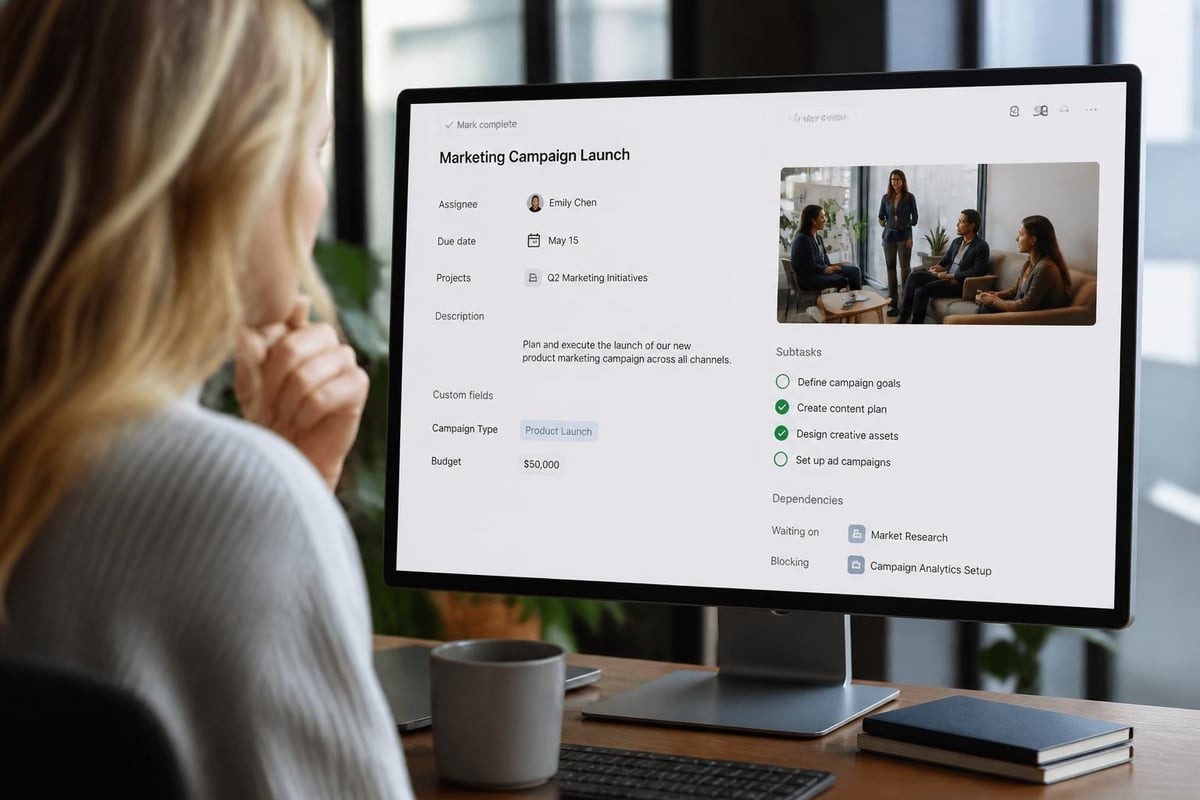
The quick-start guide to Asana outlines how tasks serve as containers for essential information: assignees, due dates, descriptions, attachments, and comments. Each task can live within a project, multiple projects through multi-homing, or exist independently in “My Tasks” for personal work.
Core Task Components
Every Asana task includes several key elements that teams rely upon for coordination:
- Assignee: One person responsible for completion (single-owner model)
- Due date: Deadline for task completion
- Description: Details, context, and requirements
- Custom fields: Status, priority, budget codes, or other metadata
- Subtasks: Breakdown of steps within the parent task
- Dependencies: Relationships showing which tasks must finish before others begin
This structure creates transparency. When a marketing manager assigns a task to a designer, both parties see the same information, deadlines, and conversation thread. The system eliminates the ambiguity that plagues email-based coordination.
Task Assignment and Ownership Models
According to the official guidance on assigning tasks, Asana enforces single-assignee accountability. This design choice reflects a specific philosophy: every task needs one person ultimately responsible for its completion. Additional collaborators can follow the task or contribute via comments, but ownership remains singular.
Benefits of single-assignee tasks:
- Clear accountability eliminates “someone else will handle it” scenarios
- Reduced confusion about who should take the next action
- Simplified notification logic (assignee receives priority updates)
- Easier workload tracking and capacity planning
Limitations to consider:
Professional services teams frequently encounter work that genuinely requires shared ownership. Client deliverables often need simultaneous input from consultants, account managers, and technical specialists. The single-assignee model can feel restrictive in these contexts, requiring workarounds like subtasks for each contributor or comments to coordinate parallel work.
| Feature | Single-Assignee Model (Asana) | Multi-Assignee Model (Alternative) |
|---|---|---|
| Accountability | Very clear | Can become diffused |
| Complex deliverables | Requires subtasks | Natural fit for shared work |
| Notifications | Focused on one person | Multiple parties stay informed |
| Reporting clarity | Simple owner metrics | More nuanced contribution tracking |
Research from the Project Management Institute’s 2024 report highlights that successful project delivery correlates with clear role definition. Asana’s approach supports this principle, though teams must decide whether task-level single ownership aligns with their actual work patterns.
Views and Task Organisation
Asana task management shines in its flexibility around viewing the same underlying task data through multiple lenses. Teams don’t work in uniform ways, so the platform adapts tasks to different mental models.
List View
The default chronological presentation shows tasks in sequential order, filtered and sorted by various criteria. This view suits teams who think linearly about work queues and prioritise based on urgency or status.
Board View
Kanban-style columns organise tasks by workflow stage: To Do, In Progress, Review, Complete. Visual teams and those following agile methodologies often prefer this perspective, dragging tasks across columns as work progresses.
Timeline View
Gantt-chart functionality displays tasks along a calendar, showing dependencies, date ranges, and how work overlaps. Project managers coordinating sequential deliverables find this invaluable for spotting scheduling conflicts.
Calendar View
Monthly or weekly calendars show when tasks are due, helping teams balance workload across time periods and avoid deadline pile-ups.
The TechRadar review of Asana notes that this multi-view capability represents one of the platform’s strongest features, allowing diverse team members to work with the same data in their preferred format.
Workload Management and Capacity Planning
Professional teams constantly face a tension between accepting new work and overloading existing staff. Asana addresses this through workload and capacity features that aggregate tasks by assignee and visualise distribution.
The guidance on managing team workload demonstrates how managers view hours allocated across team members, identify bottlenecks, and rebalance assignments before deadlines become critical. Custom fields enable teams to estimate effort for each task, creating a rough capacity model.
Practical workload scenarios:
- A consulting team tracks estimated hours per client deliverable, ensuring no consultant exceeds 40 billable hours weekly
- A software development team monitors story points across sprints, preventing individual developers from carrying excessive complexity
- An agency balances creative tasks across designers, flagging when one person has 20 hours of work due the same week
This functionality assumes tasks have meaningful effort estimates and that single assignees accurately represent actual work distribution. Teams who share work fluidly or whose task granularity varies widely may find workload reporting less reliable.

Integration with Broader Work Management
Asana task management doesn’t exist in isolation. Modern professional teams use multiple platforms: communication tools, file storage, time tracking, and customer relationship systems. The value of any task management approach depends partly on how it connects to this broader ecosystem.
As explained in Slack’s work management guide, effective work management aligns tasks with communication, documentation, and measurement. Asana offers integrations with hundreds of applications, turning tasks into coordination hubs that link to relevant conversations, files, and data.
Common integration patterns include:
- Slack: Task comments post to channels; messages convert to tasks
- Google Drive/Dropbox: Documents attach directly to tasks
- Jira: Engineering tickets sync with broader project tasks
- Time tracking: Hours logged against specific tasks for billing
For teams comparing options, Jira task management offers an alternative model focused heavily on software development workflows, whilst container-based tools organise work differently around clients or projects rather than individual tasks.
Challenges in Complex Professional Services Contexts
Whilst Asana task management excels in many scenarios, professional services teams often encounter limitations as their operations mature. Understanding these constraints helps teams make informed platform decisions.
Client-Centric Work Structures
Service delivery organisations typically organise around clients, not tasks. A law firm manages matters for each client; a consultancy runs engagements with distinct scopes, budgets, and resources. Tasks are important, but they’re subordinate to client containers that hold financial data, contracts, service level agreements, and relationship history.
Asana’s project-first architecture can represent clients as projects, but projects weren’t designed as comprehensive client records. Teams often supplement with separate CRM systems, creating integration overhead and data synchronisation challenges.
Billable Time and Financial Management
Professional services firms need tight coupling between tasks, time tracking, and billing. Which tasks consumed how many hours? What’s the margin on this deliverable? Are we tracking towards budget or overrunning?
Whilst Asana integrates with time tracking tools, the core platform lacks native financial management. Teams using professional services automation platforms expect time, tasks, budgets, and invoicing within a unified system, reducing manual reconciliation.
Service Request Workflows
Many professional teams handle reactive service requests alongside proactive projects: IT support tickets, legal questions, customer success inquiries. These workflows require intake forms, SLA tracking, escalation rules, and service catalogues.
Asana’s task model can represent service requests as tasks, but lacks purpose-built SLA management features that track response times, breach warnings, and service commitment compliance. Teams often layer additional tools atop Asana to handle service desk requirements.
Task Prioritisation and Strategic Alignment
A Harvard Business Review podcast on why project-based work fails emphasises that task completion doesn’t equal strategic success. Teams can diligently finish dozens of tasks whilst missing the outcomes that matter to clients and stakeholders.
Asana task management supports prioritisation through several mechanisms:
- Custom priority fields: High/Medium/Low labels or numbered priority scores
- Sections within projects: Group tasks by strategic theme or milestone
- Portfolio views: Aggregate multiple projects to track initiative progress
- Goals feature: Link tasks to measurable objectives
Effective use requires discipline. Teams must regularly review whether their task pipeline aligns with actual priorities, a practice explored in our guide to prioritising tasks in 2025. Without this governance, Asana becomes a repository of busy work rather than a strategic execution engine.

Automation and Reducing Manual Task Overhead
As task volumes grow, manual task creation and status updates become burdensome. Asana addresses this through rules-based automation that triggers actions based on task changes.
Common automation patterns:
- When a task moves to “Complete,” automatically create a follow-up task for review
- When a task is assigned to a team member, add it to their project and set a standard due date
- When a due date approaches, send a reminder comment to the assignee and followers
- When custom field “Client Approval” changes to “Approved,” move task to next workflow stage
These rules reduce repetitive work and enforce process consistency. A creative agency might automatically route approved concepts to production, whilst a software team triggers testing tasks when development completes.
The sophistication of automation varies by Asana plan tier, with advanced rules and custom integrations requiring higher-tier subscriptions. Teams should evaluate whether standard automation meets their needs or whether they require complex workflow orchestration better served by platforms designed for business process management.
Templates and Standardising Recurring Work
Professional teams rarely execute completely unique work. Client onboarding follows a pattern; monthly reporting involves predictable tasks; project kickoffs require standard activities. Asana task management enables teams to capture these patterns as templates.
A project template includes pre-defined tasks, assignees, relative due dates, descriptions, and dependencies. When launching a new client engagement, teams instantiate the template, and Asana creates all standard tasks with dates calculated from the project start date.
Template use cases:
- Software development teams: Sprint planning template with standard ceremonies and deliverable tasks
- Consulting firms: Engagement templates for assessment, analysis, recommendation, and implementation phases
- Marketing agencies: Campaign templates covering strategy, creative, production, and launch tasks
Templates improve consistency and reduce setup time, though they require maintenance as processes evolve. Teams should designate owners responsible for updating templates when workflows change, preventing template sprawl and outdated processes.
| Template Benefit | Description | Consideration |
|---|---|---|
| Speed | Launch projects in minutes, not hours | Requires upfront template design investment |
| Consistency | Same tasks, dependencies, and standards every time | Can feel rigid for genuinely unique work |
| Training | New team members follow established patterns | Templates must be kept current with actual practice |
| Improvement | Refine templates based on retrospective learnings | Need governance on who can edit templates |
Reporting and Task Analytics
Understanding team performance requires visibility into task completion rates, cycle times, and workload trends. Asana provides several reporting mechanisms, though depth varies by subscription tier.
Basic dashboards show task completion over time, tasks by assignee, and upcoming deadlines. Advanced reporting enables custom charts filtering by custom fields, projects, and date ranges. Teams can track metrics like average time to complete tasks of specific types or percentage of tasks completed on time.
For organisations requiring comprehensive reporting across projects, clients, and financial performance, Asana’s task-level reporting may feel limited. Many professional services firms supplement with business intelligence tools that extract Asana data alongside information from CRM, billing, and time tracking systems.
Our article on reporting headaches enterprise teams face explores common gaps in task-based reporting and strategies for comprehensive business intelligence.
Mobile Task Management and Remote Work
With distributed teams now standard in 2026, Asana task management extends beyond desktop browsers to mobile applications for iOS and Android. Team members can review tasks, update status, add comments, and upload photos from client sites or whilst travelling.
Mobile capabilities:
- Inbox for notifications and task assignments
- “My Tasks” view for personal task queue
- Quick task creation via mobile interface
- Offline mode for viewing and limited editing
Mobile access supports flexibility but introduces challenges around information density. Complex project timelines and detailed task descriptions work better on larger screens. Teams should consider which workflows genuinely require mobile access versus which are more efficiently handled at a desk.
Comparing Asana Task Management to Alternative Approaches
Professional teams evaluating task management platforms should understand how Asana’s model differs from alternatives. The comparison with board-based tools highlights structural differences in how platforms organise work.
Asana’s task-centric model treats tasks as foundational units, organised into projects, with multiple views available. This suits teams who think primarily about deliverables and individual accountability.
Alternative container-based platforms organise work around clients, matters, or service requests, with tasks as subordinate elements within these containers. This better matches professional services workflows where client context matters more than task-level detail.
Issue-tracking systems like Jira prioritise engineering workflows with specific fields for bug severity, sprint allocation, and code branches. These work well for software development teams but feel over-engineered for general business work.
The right choice depends on your primary workflow pattern. Teams handling reactive service requests might explore alternatives to Freshdesk, whilst those focused on project portfolios might compare Asana directly to ClickUp or evaluate Chronodesk’s integrated approach.
Security, Permissions, and Enterprise Considerations
Enterprise teams require granular control over who accesses which tasks and projects. Asana task management provides project-level permissions with team-based access control, though some organisations require more sophisticated security models.
Standard Asana security features include:
- Public vs private projects (team members vs invited guests)
- Admin controls over team membership and billing
- Two-factor authentication for account access
- Activity logs showing task and project changes
- Data export for compliance and archiving
Enterprise tiers add SAML single sign-on, advanced admin controls, and enhanced support. Teams handling sensitive client data or operating in regulated industries should evaluate whether Asana’s security model meets their compliance requirements, particularly regarding audit trails and data residency.
Best Practices for Sustainable Task Management
Simply adopting Asana doesn’t guarantee effective task management. Successful teams develop practices around task hygiene, workflow governance, and periodic review.
Task hygiene practices:
- Descriptive task names: “Review Q4 report” not “Review”
- Clear assignees: Every task has an owner, even if provisional
- Realistic due dates: Dates reflect actual delivery requirements, not aspirational targets
- Regular updates: Task status changes reflect current reality
- Comment discipline: Key decisions and context live in tasks, not separate email threads
Governance practices:
- Weekly review of overdue tasks and reassignment where needed
- Monthly template updates based on process improvements
- Quarterly review of custom fields and workflow stages to remove unused elements
- Clear escalation paths when tasks are blocked or at risk
Teams should also guard against task proliferation, where everything becomes a task regardless of size. Not every three-minute activity deserves formal task tracking. Finding the right granularity prevents the system from becoming administrative overhead rather than a productivity aid.
Making the Task Management Platform Decision
Asana task management offers a mature, flexible approach to coordinating team work through structured tasks, multiple views, and extensive integrations. It serves many teams effectively, particularly those whose work naturally decomposes into discrete tasks with clear ownership.
Professional services teams should carefully evaluate whether task-centric architecture aligns with their actual operational needs. Organisations requiring tight integration of tasks with client records, financial management, time tracking, and service delivery workflows may find that purpose-built platforms designed for professional services automation offer more natural fit.
The decision isn’t purely about features. Consider your team’s working style, the complexity of your client relationships, your financial management requirements, and whether you prefer best-of-breed point solutions or integrated platforms that reduce tool sprawl.
Asana task management provides powerful coordination capabilities for teams who need visibility, accountability, and structure around deliverables. Understanding its strengths and limitations helps organisations make informed platform decisions aligned with their actual workflows and business requirements. If you’re seeking a comprehensive solution that integrates task management with client work, time tracking, billing, and professional services automation, Chronodesk offers a unified platform designed specifically for professional teams managing complex client delivery in structured environments.